
Today we are releasing an update to Pods, version 2.4.1, an update to the Pods add-on plugin Pods Frontier Auto Template, version 1.1 and releasing a new add-on plugin Pods AJAX Views. You can download each of them from WordPress.org today. As always, these plugins are offered at no cost, and under the terms of a free software license thanks to the support of our donors, and our sponsor Automattic.
In addition to these releases we are happy to announce that Pods Frontier, the advanced layout and template editor is now in public beta. At the end of this article are short updates and links to some of the new plugins we have under development.
What’s New In Pods 2.4
Pods 2.4.1 is mainly comprised of issues that we fixed while working on Pods 3.0, but wanted to make available. These included issues with the Pods Templates editor, PodsUI, and improving the user experience when adding new items via an autocomplete relationship field. Pods 2.4.1 has no new features, but does include many new hooks, listed below. For a complete list of all changes, see the changleog in the readme.
One exciting new change in 2.4.1 is the ability to use pods() without any parameters. If no parameters are set, pods() will attempt to set the Pod to current post type or taxonomy. Example usage would be in theme template file used to display multiple custom post types with the same fields.
New Hooks:
- ‘pods_pod_form_success_message’ filter for changing the message when Pods Forms are successfully submitted.
- ‘pods_view_alt_view’ filter for overriding normal Pods Views to be loaded in via AJAX inline from Pods AJAX Views plugin.
- ‘pods_act_editor_before_metabox’ action for outputting additional content at the top of the Pods fields meta box of the ACT editor.
- ‘pods_act_editor_after_metabox’ action for outputting additional content at the bottom of the Pods fields meta box of the ACT editor.
- ‘pods_act_editor_before_sidebar’ action for outputting additional content at the top of the ACT editor sidebar.
- ‘pods_act_editor_after_sidebar’ action for outputting additional content at the end of the ACT editor’s sidebar.
- ‘pods_act_editor_before_navigation’ action for outputting additional content at the top of ACT editor’s post navigation.
- ‘pods_act_editor_after_navigation’ action for outputting additional content at the bottom of the ACT editor’s post navigation.
- ‘pods_act_editor_before_title’ action for outputting additional content before the item title field in the ACT editor.
- ‘pods_act_editor_after_title’ action for outputting additional content after the item title field in the ACT editor.
- ‘pods_admin_components_menu’ Filter to add/edit components submenu items.
Introducing Pods AJAX Views
Pods AJAX Views improves upon the partial page caching capabilities of pods_view(), off-loading them into a separate asynchronous AJAX call that allows the rest of the page to be built and sent to the browser, while the view loads. When the AJAX request runs, the view is cached like normal, so subsequent calls to the Pods AJAX View code will produce the exact same result as a default pods_view would. This plugin can decrease page load time and prevent timeout errors on hosts that limit page load time.
This new plugin can be used to include a cached, template part loaded via AJAX either using the function pods_ajax_view() or via the pods_view() function in Pods thanks to the new ‘pods_view_alt_view’ filter. The ‘pods_view_alt_view’ filter allows you to “upgrade” your existing Pods Views to use the new AJAX loading provided by this new function, with a fallback to the old system if the plugin becomes deactivated. This functionality is implemented automatically, when the constant PODS_AJAX_VIEWS_OVERRIDE is set, by simply adding this code to your wp-config.php:
define( 'PODS_AJAX_VIEWS_OVERRIDE', true );
[caption id=”attachment_185131″ align=”aligncenter” width=”1024″]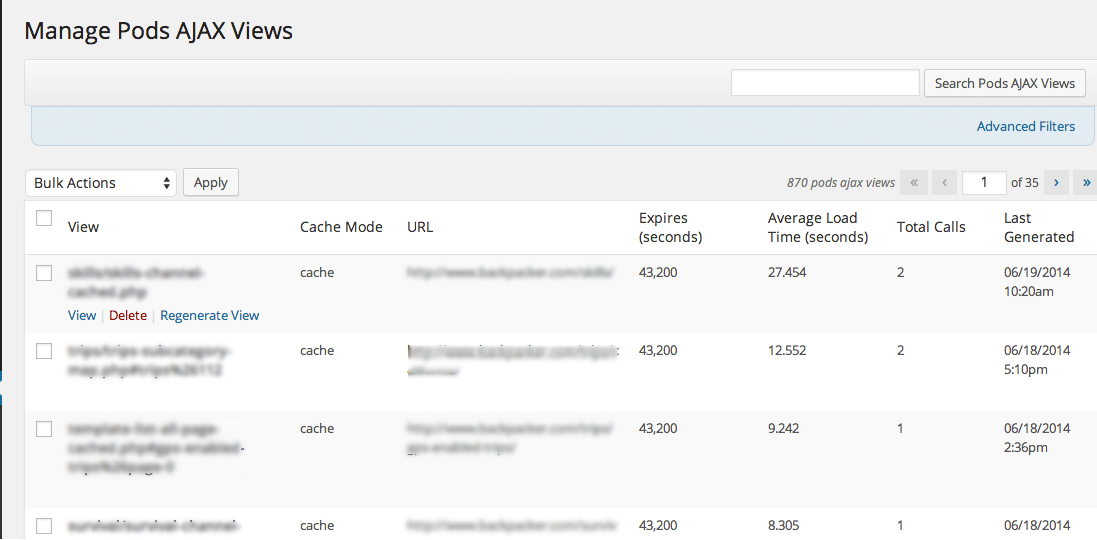 Pods AJAX Views Manage Page[/caption]
What’s New In Pods Auto Templates 1.1
Version 1.1 includes several bug fixes in addition to new features. In the new version, you can locate your template before, after or in place of post content, and select that position using a drop-down menu. There is now also an option to output the template on ‘the_excerpt’ filter and to choose templates from a drop-down menu and an option to select templates to be used from a drop-down menu. Until Pods 3.0 is released, these options must be set by defining constants in your wp-config.php file.
To select templates from a drop-down instead of entering their names:
define( 'PFAT_TEMPLATE_SELECT_DROPDOWN', true );
To allow this plugin to act on post excerpts as well as post content:
define( 'PFAT_USE_ON_EXCERPT', true );
For more information on the changes, and how to use this plugin, see this tutorial.

Pods Plugins In Public Beta
- Pods Frontier – Advanced responsive layout editor and template enhancements. Now in public beta and almost complete.
- Pods JSON API – Adds Pods endpoints to the API generated by WP-API. See the readme for new resources for using this plugin, including an example front-end client.
- Pods Gravity Forms Add-On – Now with a UI for mapping form fields to Pods fields.
- Pods Visualize – A tool for illustrating the relationships between Pods.
- Pods Job Queue – Queue callbacks to be ran with arguments, unlike wp_cron which is scheduled jobs, these are queued and run concurrently as needed.